Email notifications
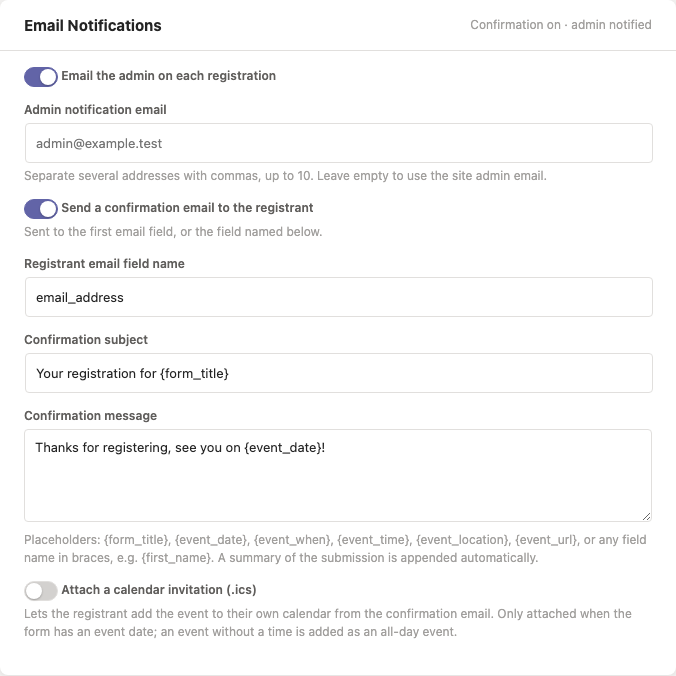
Each form has its own Email Notifications settings in the form editor's right panel. Emails are sent for every accepted submission - including in webhook-only mode.
Turning all emails off
LocalForm → Settings → Email → Send notification emails is the switch for the whole site. Turn it off and LocalForm sends nothing at all: no admin notification, no registrant confirmation, for any form. The form editor stops offering the Email Notifications panel too, so nobody configures an email that would never arrive.
Nothing is deleted. Every form keeps the settings it had, and they start working again the moment you switch sending back on.
Leave it on (the default) to configure notifications per form, as below.
:::tip Paid forms can hold their emails A form that charges for a registration (Pro) can wait until the money actually lands before sending anything, so nobody is confirmed for a registration they never paid for. Both emails below are then sent - once - the moment the payment is confirmed. :::
Admin notification
Enable Email the admin on each registration to get a plain-text email for every submission, containing the form title, submission ID, event date, all submitted answers, and a link to the submissions screen.
The recipient defaults to the site admin email (Settings → General); set Admin notification email to override it per form.
Telling more than one person
Admin notification email takes a list, so a registration can reach the coordinator, the treasurer and whoever is on the door at once. Separate the addresses with commas:
coordinator@example.com, treasurer@example.com, desk@example.com
Semicolons and line breaks work too, because the thing being pasted in is usually a line copied out of a mail client. Up to ten addresses per form.
Everyone named gets the same email, and they can see each other in the To line - these are the people running the form, not its registrants, so nobody's address is being disclosed to a stranger. The delivery log records it as one entry naming the recipients; a list long enough to overflow the log's own column is shortened there and nowhere else, so the email itself still reaches everybody.
A few smaller rules, so the box behaves the way you would guess:
- An address that is not one is dropped when you save, rather than the save failing. The field then shows what survived, which is how you spot the typo.
- The same address twice is one recipient, whatever case it was typed in.
- Clearing the box goes back to the site admin address, as it always has.
:::tip Somebody who should not have a login An address here does not need a WordPress account - it is just an email address. This is the free way to keep a colleague in the loop. If what they actually want is the responses rather than a message per response, Pro's scheduled export by email mails the whole spreadsheet on a timetable instead. :::
Registrant confirmation
Enable Send a confirmation email to the registrant to email the person who submitted the form.
- Recipient: the first Email field in the form, or the field named in Registrant email field name. If the submission contains no valid email address there, no confirmation is sent.
- Subject defaults to "Your registration for form title".
- Message defaults to a thank-you line. A plain-text summary of the submitted answers is always appended, plus the event's own facts when set - the date and time, when it ends, the location, the joining link of an online event, and the organizer. This one field has no formatting toolbar - LocalForm sends plain-text email, so bold text and links would arrive as raw markup.
Placeholders
Subject and message support tokens, replaced per submission:
| Token | Replaced with |
|---|---|
{form_title} | The form's title |
{event_date} | The form's event date, formatted per site settings |
{event_when} | The whole of when it runs - date, time and end, as one line |
{event_time} | The start time, in the site's time format |
{event_location} | The venue as it was typed |
{event_url} | The joining link of an online event. Only ever sent to registrants - it is not on the public form page |
{field_name} | The submitted value of that field (use the database field name, e.g. {first_name}) |
Did it actually go out?
LocalForm → Settings → Email → Delivery log records every message the plugin sends: the form it belongs to, whether it was an admin notification, a registrant confirmation or a test, who it went to, the subject, and whether the mailer accepted it. When one is refused, the mailer's own error is shown underneath - which is usually the whole answer ("SMTP connect() failed", an authentication error, a rejected sender domain).
Filter by form or by status, the way the webhook log works.
Message bodies are never stored. The log holds who a message went to and what it was about, not what it said - a confirmation email repeats the whole submission back, and a second copy of that is another thing to purge on an erasure request for no gain. Entries are deleted after 30 days; the window is set under LocalForm → Settings → Data.
Send a test email
Test Delivery, on the Email settings screen, sends one message from the site using the sender settings above and records the result in the log. It works whether or not notification emails are switched on site-wide, because checking that mail leaves the site at all is exactly what you do before turning them on.
If the test says it was handed to the mailer but nothing arrives, the problem is between the site and the inbox - check spam first, then look at deliverability below.
When sending fails
The first time a message fails, LocalForm shows a warning on its own admin screens - never site-wide - naming the recipient, the time and the mailer's error, with a link to the log. Dismissing it is per person and lasts until the next failure: a later one is news again and says so.
This exists because a site whose host silently refuses mail looks exactly like a site nobody is registering for. The webhook log has always been able to answer that question; now email can too.
Deliverability
Emails are sent through wp_mail(), so anything that improves WordPress email deliverability (an SMTP plugin, a transactional email service) applies to LocalForm too. The from name/address and reply-to used for all LocalForm emails are set globally under LocalForm → Settings → Email.
Developers can adjust recipients and content via the localform_admin_notification_recipients and localform_confirmation_email filters.