Event details
Every form has an Event Details panel in its settings: when the event runs, where, who is organising it, and what it costs.
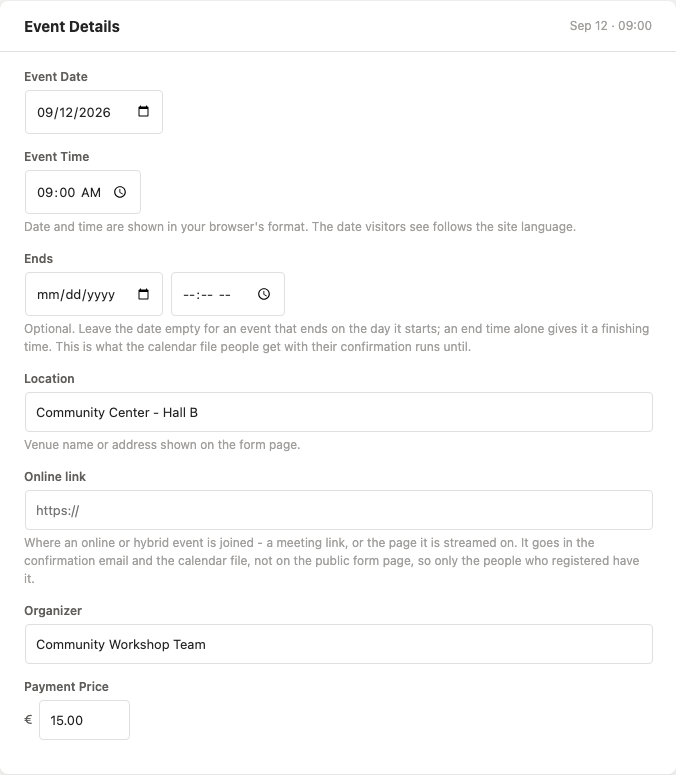
| Field | What it is for |
|---|---|
| Event Date / Event Time | When it starts. The date on its own makes it an all-day event. |
| Ends | Optional. A date for an event running over more than one day, a time for one that finishes the same day, or both. An end before the start is discarded rather than stored. |
| Location | Venue name or address, shown on the form page. |
| Online link | Where an online or hybrid event is joined. Not shown on the form page - see below. |
| Organizer | Who is running it. |
| Payment Price | A number shown on the form. To actually take the money, see Payments. |
Whatever is filled in appears as a single line of event facts inside the form on the frontend, between the title and the first question - along with how many places are left, on a form that asks to say so. Uncheck Show event card on form page in the General panel to keep the data without displaying it.
The online link is for registrants only
The joining link is deliberately kept off the public form page. It goes to the people who registered - in their confirmation email (as Join online:, and as the {event_url} placeholder if you write your own wording) and in the calendar file attached to it, where it becomes the entry's location so their calendar shows a join button.
A meeting link on a public page is a meeting anybody can walk into, which is why it is not printed there, and not published in the structured data below either.
In the calendar file
The confirmation email can carry a .ics attachment, so the event lands in the registrant's own calendar. It uses the start, the end, the location or joining link, and the organizer. Without an Ends of its own an event is assumed to run for an hour (localform_ics_duration_minutes changes that); with one, it is taken at its word.
With multiple event dates, the file carries one entry per date rather than only the first.
In the webhook payload
event_date, event_time, event_end_date, event_end_time, event_url, event_location, event_organizer and payment_price.
In search results
A form with an event date publishes a schema.org Event description in the head of its own page - the name, when it runs, where, the organizer, what it costs, and whether it is still open or sold out. That is what lets a search engine list it as an event rather than as an ordinary page.
- It is written on the form's own page only. A form embedded in a page of your own is that page's markup to own, and two descriptions of one event is worse than one.
- Unchecking Show event card on form page switches it off as well: those are the same facts in another format, and you have already said not to publish them.
- The price is published only when the site's currency symbol (Settings → General) names one currency for certain. "kr" is three countries', so it is left out rather than published as the wrong money -
localform_currency_codeis how a site says which it means. - The joining link of an online event is never included.
With Pro, each event date is described as an event of its own, linking to the form with that date already chosen, and each rate becomes an offer of its own.
All of this is part of the free plugin - no add-on required.
LocalForm Pro extends this same panel in three ways:
- Multiple event dates - for an event that runs on several dates, plus an optional question asking registrants which date(s) they will attend, and a number of places per date.
- Multiple event prices - for an event that costs different amounts for different people, as a labelled rate list next to the single payment price.
- Payments - to take the money along with the registration.