Cut down spam on your forms
Five minutes, once per site. Everything here lives under LocalForm → Settings → Security, and the settings that matter most are on by default. Turn the rest on before you advertise a form rather than after the first hundred junk submissions.
Almost none of it asks your visitors to prove anything. There is no puzzle to solve, no images of traffic lights, and nothing to sign up for - and the one setting that can show a puzzle is off until you switch it on, and can be set to leave ordinary visitors alone even then.
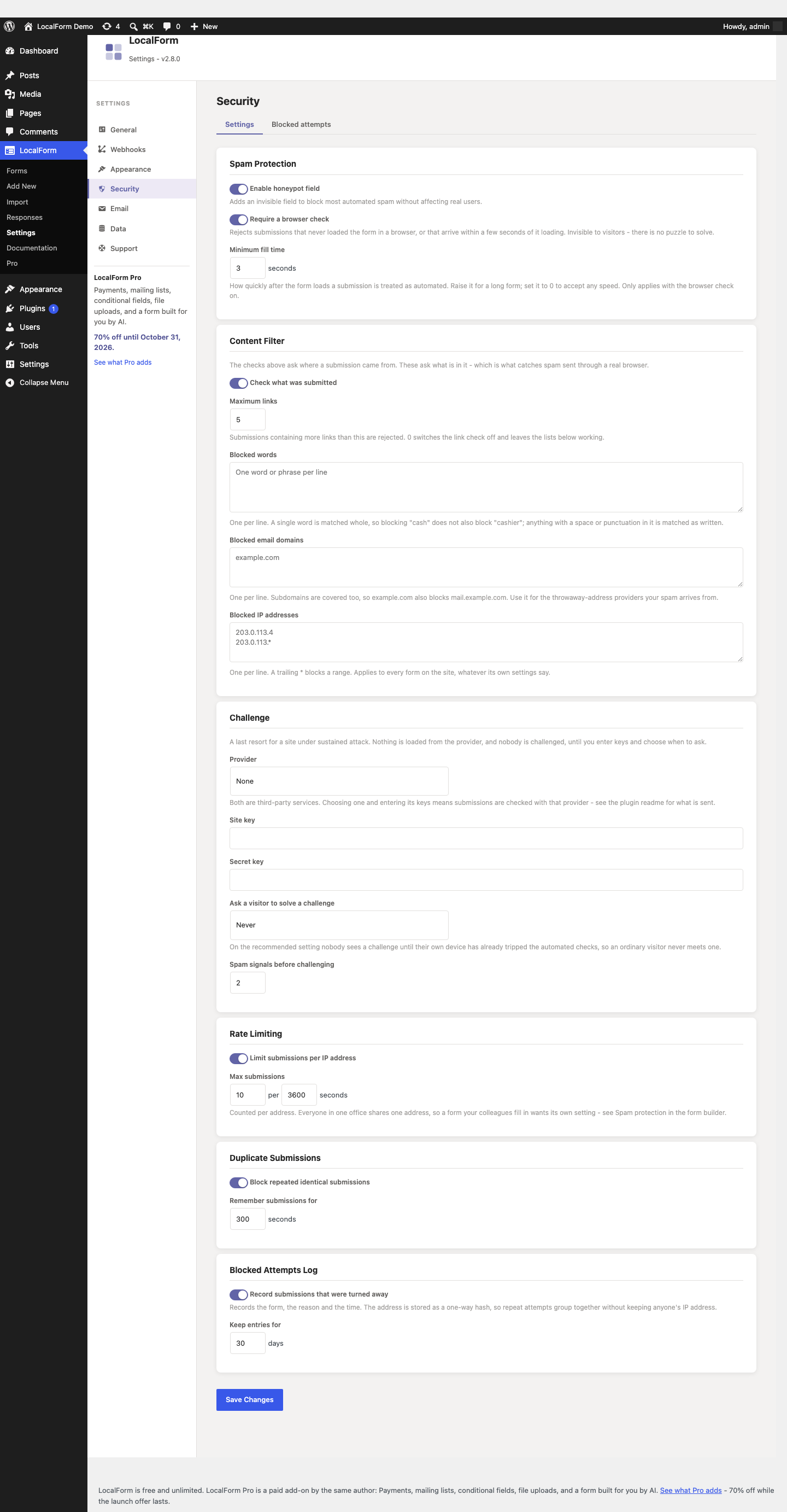
1. Spam Protection
Turn it on. It adds an invisible honeypot field to every form: a question no visitor can see, which automated scripts fill in anyway. A submission that has filled it in is discarded.
This is the one that does most of the work, and it costs a real visitor nothing - people using a screen reader or a password manager are unaffected, because the field is hidden from them too.
The field's name is different on your site than on anyone else's, and changes daily, so a bot cannot be taught to skip "the LocalForm honeypot" once and be done with it.
2. Browser check
Also on the Spam Protection card, and also invisible. It turns away two things the honeypot alone lets through:
- Submissions that never opened your form. Most spam is sent by a script posting straight to your site, having read the form's address once. Anything that did not load the page in a real browser is rejected.
- Submissions sent too fast. A script fills a form in milliseconds. A person does not. Anything arriving within the minimum fill time of the form loading is treated as automated.
The minimum fill time is three seconds out of the box. Raise it for a long form nobody could honestly complete quickly; set it to 0 to accept any speed while leaving the rest of the check on.
Leave the check itself on unless you have a specific reason not to. It does nothing to a visitor filling in your form normally, and someone who leaves the page open for hours is quietly given a fresh pass when they submit, rather than being shown an error.
Two things worth knowing:
- It needs JavaScript - but so does submitting a LocalForm form at all, so it rules out nobody who could have registered anyway.
- After updating the plugin, sites that serve cached pages get a 24-hour grace period before the check is enforced, so a form cannot break mid-campaign while an old cached copy of the page is still being served. If you run a caching plugin, clearing its cache after updating makes the check take effect immediately.
Repeated rejections from this check or the honeypot count against the sender: after a handful, that visitor is turned away outright for the rest of the rate-limiting window, so a bot cannot keep trying for free.
3. Content Filter
Everything above asks where a submission came from. The content filter asks what is in it - which is what catches spam sent through a real browser, the kind that passes every invisible check because a real browser genuinely did open your form.
- Maximum links. Submissions containing more links than this are rejected. Five is the default: a number no honest answer reaches and every link-farm payload blows past. Set it to
0to switch the link check off and keep the lists below. - Blocked words. One word or phrase per line. A single word is matched whole, so blocking
cashdoes not also blockcashier; anything with a space or punctuation in it is matched exactly as written. - Blocked email domains. One per line. Subdomains are covered too, so
example.comalso blocksmail.example.com. Addresses are found anywhere in a submission, not just in email questions - a bot that hides its address in the middle of a message is still caught. Use this for the throwaway-address providers your spam actually arrives from; there is no bundled list to keep up to date. - Blocked IP addresses. One per line, with a trailing
*to block a range (203.0.113.*). This one applies to every form on the site whatever its own settings say, and it is checked before anything else - a blocked address never gets as far as being counted or parsed.
Start with the link limit alone. Add words and domains from what you actually see in the blocked attempts log and in your real submissions, rather than guessing up front.
4. Challenge (optional)
A last resort for a site under sustained attack. Nothing is loaded from the provider, and nobody is challenged, until you choose a provider, enter its keys and pick when to ask.
LocalForm supports Cloudflare Turnstile and hCaptcha. Both are free for ordinary use, and both are third-party services - when one is switched on, the visitor's browser loads a script from that provider and your site checks the answer with them. See "External services" in the plugin's readme for exactly what is sent.
There are three settings for when to ask:
| Setting | What happens |
|---|---|
| Never | Nothing is loaded and nobody is challenged. The default. |
| Only after repeated spam signals | The recommended setting. Nobody sees a challenge until their own device has already tripped the automated checks a couple of times. An ordinary visitor never meets one, and no provider script is loaded on their page at all. |
| On every submission | Every visitor solves a challenge before their submission is accepted. Reserve it for a form being hammered right now. |
On the recommended setting the challenge appears in place, under the form, when a submission comes back needing one - solving it resends what was already filled in, so nothing is retyped. A solved challenge stands for half an hour, so a person who mistypes a field afterwards is not asked again.
With On every submission, a form's submissions depend on the provider being reachable. If their service is down, submissions are refused rather than let through unchecked. The recommended setting has no such exposure for ordinary visitors.
5. Rate Limiting and Duplicate Submissions
Rate Limiting caps how many submissions one IP address may send within a time window. Pick something a person could never hit but a script will: for a registration form where each visitor submits once, a handful per hour is generous.
Be careful on a form a household or an office might legitimately submit several times in a row - everyone behind one router shares one address. That is what per-form settings below are for.
Duplicate Submissions blocks a repeated, identical submission for a number of seconds. A blocked resubmission shows "This submission has already been received." instead of saving again. This is aimed at a different problem from the rest: the visitor who double-clicks the button, or reloads the thank-you page. A window of a minute or two catches both without ever bothering anyone.
6. Blocked attempts log
Settings → Security → Blocked attempts lists every submission that was turned away: which form, when, and why. The summary along the top counts the last seven days by reason.
This is what turns the settings above from guesswork into tuning. It answers two questions nothing else can:
- Is any of this doing anything? A week with nothing in the log means your forms are not being targeted, and you can leave the optional settings off.
- Is it catching real people? A run of Submitted too quickly or Failed the browser check on a form real visitors use is a sign to lower the minimum fill time, not to tighten anything.
No IP addresses are stored. Each entry carries a one-way hash of the sender's address, so repeat attempts from one client group together on screen without your site keeping anyone's address. Entries are deleted after 30 days by default, and the whole log can be cleared with one button.
Per-form settings
One set of numbers rarely fits every form on a site. In the form builder, Spam Protection → Give this form its own spam settings takes a form out of the site-wide settings and gives it its own.
The two cases worth doing it for:
- An internal form your colleagues fill in from one office address, where the site-wide rate limit would lock out the tenth person to use it. Raise its limit, or switch it off for that form.
- The one public form that keeps getting hit, where you want a challenge or a tighter link limit without imposing either on the rest of the site.
Switching the override on starts from the site's current values, so you can see what you are taking over. Switching it off returns the form to following the site. The blocked word, email domain and IP lists always stay site-wide.
Answer length limits
Every text answer has a maximum length, so one request cannot put megabytes into your database and then carry it again into every notification email and webhook delivery. Out of the box: 5000 characters for a long-answer question, 1000 for a short one, and the address-length limit for an email question.
A question can set its own in the builder - Maximum length, on short text, long text, email and phone questions. Leave it empty for the default. The limit is enforced on the server and applied to the field on screen, so somebody typing simply runs out of room rather than being told off after submitting.
What to expect afterwards
The honeypot and the browser check together stop the great majority of automated spam, which for most sites is all of it. The content filter is what catches the rest. What none of it stops is a human being typing junk into your form by hand - that is what your own eye on Responses is for.
If junk is still arriving:
| What you see | What tends to help |
|---|---|
| Bursts of similar submissions, seconds apart | Tighten Rate Limiting - a burst from one script is one IP address |
| Messages full of links | Lower Maximum links |
| The same throwaway address again and again | Add its domain to Blocked email domains |
| The same wording again and again | Add a distinctive phrase from it to Blocked words |
| Spam that passes everything, in volume | Set the Challenge to "Only after repeated spam signals" |
| A trickle of hand-typed junk | Close registration when you do not need it open (registration limits), or add a question a bot-farm worker will not bother answering |
| The same submission stored twice | Raise the Duplicate Submissions window |
| Real registrations being blocked | Check the blocked attempts log for the reason. Loosen Rate Limiting first - it is the setting most likely to catch a genuine visitor, since people behind one router share an IP address |
| "Submission rejected" right after a plugin update | Clear your caching plugin's cache, so visitors stop being served the old cached version of the form page |
Fewer places to be found
Two habits that matter more than any setting:
- Close what you are not using. A form that no longer takes registrations should be set to Draft, or given a closing time - see registration limits.
- Do not leave test forms published. They are indexed like any other page, and they are found.
Developers hooking in their own rules - a members-only window, an allowlist - can filter the final accept/reject decision with localform_is_accepting, and add their own content rules with localform_spam_filter_result. The rest is tunable with localform_security_settings, localform_min_fill_seconds, localform_token_max_age, localform_spam_block_threshold, localform_field_max_length and the localform_max_request_* filters - see hooks.