Importing forms
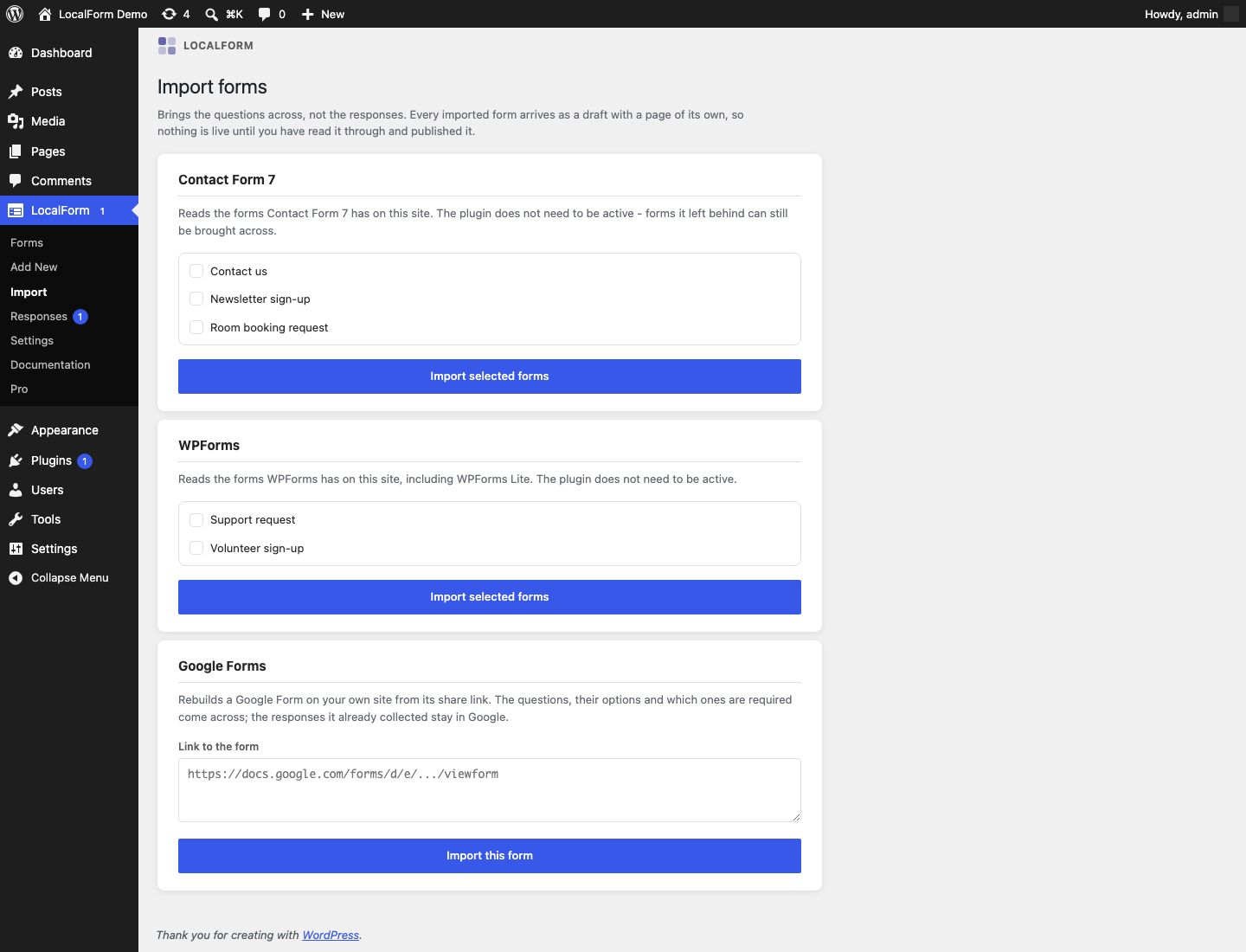
If you already built the form somewhere else, you do not have to type it again. Forms → Import brings the questions across from Contact Form 7, WPForms and Google Forms.
What comes across, and what does not
An import copies the questions: their wording, their type, their options, and which ones are required. It does not copy:
- the responses already collected. They stay where they are. Export them from the old form if you need to keep them;
- the emails and confirmations the old form sent. LocalForm has its own, under the form's Notifications tab;
- the styling. An imported form uses your LocalForm colours and font like any other.
Every imported form arrives as a draft with a page of its own, so nothing goes live until you have read it through and pressed Publish. That is on purpose: an import is a first draft of somebody else's form, read by a parser that has to make judgement calls, and a draft is the version you get to correct first.
Contact Form 7
Go to Forms → Import. Every source has a card of its own; the Contact Form 7 card lists the forms found on this site - tick the ones you want and press Import selected forms. If it says no forms were found, this site has none: the forms live on whichever site you built them on.
Contact Form 7 does not have to be active. Its forms stay in the database when the plugin is deactivated, which is exactly the moment you are most likely to want them.
A few things are worth knowing:
- Labels are read from the surrounding markup. Contact Form 7 keeps a form as one block of HTML with its own tags written into it, so there is no label to read - only the words next to the tag. That is where its own examples put them, and it is right nearly always, but check the wording in the builder before you publish.
- Field names are kept. A question that was arriving at a webhook as
your-emailstill arrives asyour-email, so anything you built against the old form keeps working. - A tick box's statement is the sentence written after it.
[acceptance accept-1] I agree to the house rulesbecomes a consent question saying "I agree to the house rules". - The submit button, hidden fields and CAPTCHA tags are dropped. None of them asks the visitor anything.
WPForms
Same screen, same list, same rules about the plugin not needing to be active. WPForms Lite forms import too.
WPForms builds some questions out of several inputs at once, and LocalForm has no compound question, so:
- a Name field split into first and last becomes one text question;
- an Address becomes one long-text question;
- questions arranged in columns keep their order and lose the arrangement;
- the page breaks become steps, exactly as they were - except the first one, which is WPForms' progress bar rather than a break in the questions.
- a Net Promoter Score question comes across as a rating in the NPS style, so it is still scored as an NPS here;
- a Likert scale keeps its rows as statements and its columns as its scale. One set to accept several answers per row ends up asking for one, which the report says.
Each of these is named in the report after the import, so you know what to tidy.
Google Forms
Google Forms lives somewhere else, so there is nothing to list. Paste the form's share link into the box and press Import.
The link is the one Send → link gives you - it starts with docs.google.com or forms.gle. Two things have to be true for it to work:
- the form is set so that anyone with the link can open it. A form that requires signing in cannot be read;
- the form is accepting responses. A closed form serves its closed message instead of its questions.
This is the one time LocalForm fetches something from the internet, and it happens only when you press the button. Only Google's own form addresses are ever fetched, nothing about your site is sent anywhere, and no account or API key is involved - it is the same public page anyone with the link already sees. If you would rather your site made no request at all, open the form in your browser, view the page source, and paste that into the box instead: the importer cannot tell the difference.
Google has a few questions LocalForm does not:
| Google Forms | In LocalForm |
|---|---|
| Short answer, Paragraph | Text, Long text |
| Multiple choice, Dropdown, Checkboxes | Single choice, Dropdown, Checkboxes |
| Linear scale | Rating, over the same range |
| Multiple choice grid | A Choice Grid, keeping the rows as its statements and the columns as its options. A grid whose rows have no wording is left out instead. |
| Tick box grid | A Checkbox Grid, the same way. |
| Date | Date |
| Section | A step |
| Title and description | A text block |
| Time | A text question - check the wording |
| File upload, Image, Video | Left out, and named in the report |
Google's help text under a question becomes the LocalForm question's placeholder, which is the nearest place a reader looks for the same hint.
After the import
The report at the top of the Import screen says what was created and what was left out. Open the form from that list and:
- read the questions through. Fix any label the parser got wrong;
- add what was left out by hand, if you need it;
- set the email notifications on the Notifications tab - an imported form sends nothing until you tell it to;
- check the address on the Settings tab. The form got a page of its own with a slug made from its title;
- publish it.
If you were running the old form on a page, replace it there with the [localform id="123"] shortcode or the LocalForm block. See Embedding a form.
Importing from something else
The list of sources is extensible: an add-on or a snippet can register its own with the localform_importers filter, and everything above - the screen, the report, the draft, the field naming - comes with it. See the hooks reference.