Conditional fields (Pro)
With LocalForm Pro active, every question card in the builder gets an extra control: Only show this question when …
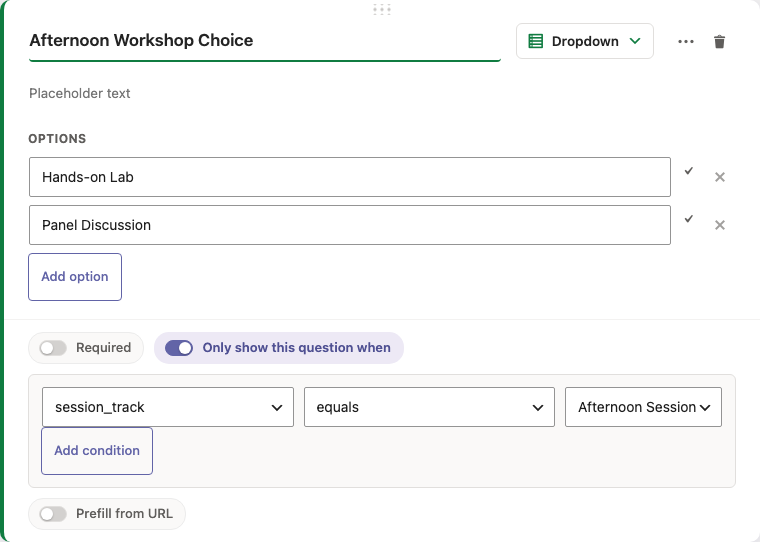
Setting up a condition
- Edit a form and open the question you want to show conditionally.
- Tick Only show this question when at the bottom of the card.
- For each condition row, pick the source question (by its field name), an operator, and - except for is not empty - a value.
- If the source question is a dropdown, radio, or checkbox field, the value control becomes a dropdown of that question's own options instead of free text, so a condition can only ever reference a value the source question can actually produce.
- Click Add condition to add another rule. Once there are two or more rules, a Match all / any of the following selector appears:
- all (AND) - every rule must match.
- any (OR) - at least one rule must match.
- Remove a rule with the × button next to it (only shown once there's more than one rule).
Operators:
| Operator | Shows the question when… |
|---|---|
| equals | the source answer is exactly the value |
| does not equal | the source answer is anything else |
| contains | the source answer contains the value as a substring |
| is not empty | the source question was answered at all |
For checkbox (multi-select) sources, a rule matches when any selected option satisfies it.
How it behaves
- In the browser: the question is hidden and its inputs disabled until the condition is met, re-evaluated live as the visitor types or selects.
- Server-side: a hidden question is skipped entirely during validation - a required question that is hidden does not block submission, and its value is stored empty. This means conditions cannot be bypassed by manipulating the request.
Notes
- Conditions reference the source question's field name (the database name, editable via the ⋯ menu on the card).
- A question can have multiple rules, combined with AND or OR; chained conditions (A shows B shows C) still evaluate each question's condition against the submitted values independently.
- Static text/image blocks cannot carry conditions.
- Forms saved before multi-rule support keep working unchanged - their single rule is treated as a one-rule AND condition until the form is next saved in the builder.