Field templates (Pro)
LocalForm → Settings → Field Templates lets you define a reusable field once (label, key, type, options) and insert it into any form from the builder, instead of rebuilding it each time - handy for a "Company name" or "How did you hear about us?" question you ask on every form.
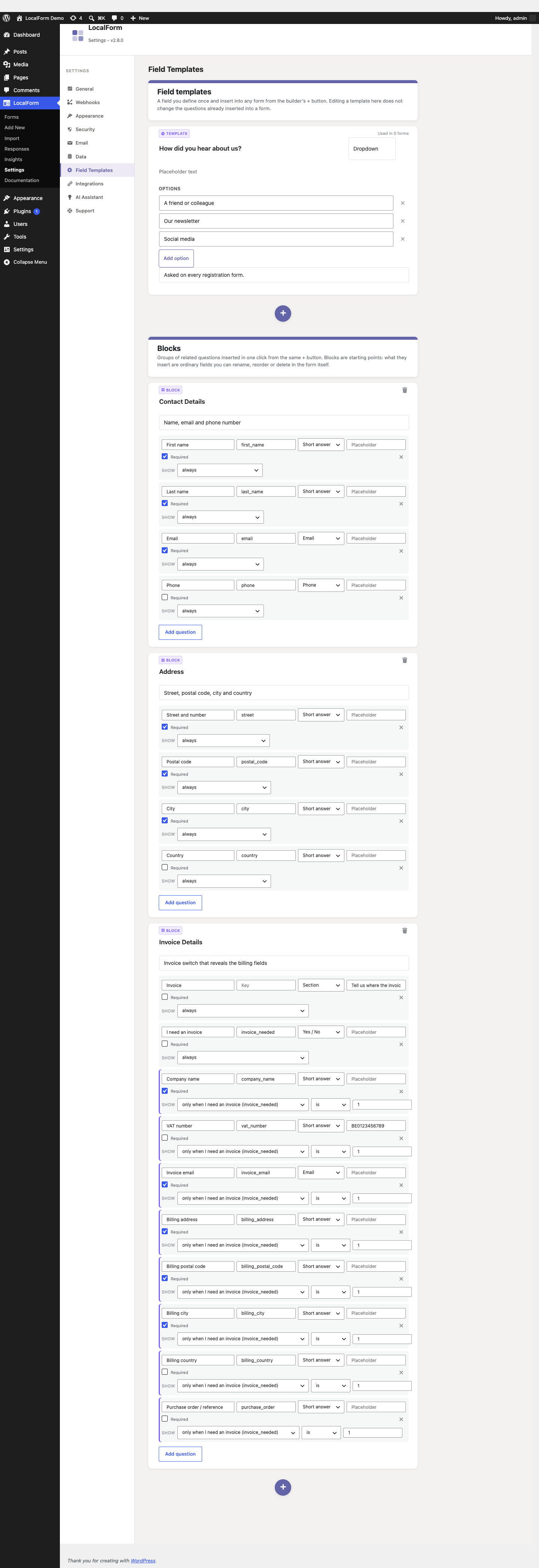
The screen is the form builder's own canvas: a template is edited in the same card the question it becomes is edited in. The + underneath the list adds one, and each card saves on its own.
Inserting one
In the builder, the + under the last question offers New question first, then every block and field template - so a form is built from either without leaving the canvas. The template button in the floating toolbar on the right opens the same list.
Blocks
Below the templates, the same screen lists the blocks - groups of related questions inserted in one click:
- Contact Details - first name, last name, email, phone.
- Address - street and number, postal code, city, country.
- Invoice Details - a Section, an "I need an invoice" Yes / No switch, and the billing questions (company name, VAT number, invoice email, address, postal code, city, country, purchase order reference) each already set to show only when that switch is on.
Because the switch stores 1 rather than a translated "Yes", the Invoice Details block behaves the same whatever language the form is in.
Blocks are starting points, not links: the inserted questions are ordinary fields you can rename, reorder or delete - including the conditions, which are normal conditional field rules - and they don't update when the block changes. Use a field template instead when you want one central definition across forms.
Changing a block
Every block on that screen is editable: rename it, change what it says in the + menu, and add, remove or retype the questions it inserts. Add question appends a row; the × at the end of a row drops it.
Each row also carries its own Show line - always by default, or only when another question in the same block is / is not / contains / is answered a value. That is how Invoice Details hides its billing questions behind the switch, and it is set the same way in a block of your own. The picker only ever lists questions from the same block, so a rule cannot point at something the block does not insert; rename or remove that question and the rules following it move with it.
The + under the blocks makes a block of your own, which shows up in the builder next to the ones that ship with Pro.
A block that ships with Pro shows Reset to default once you have edited it - that throws away your version and puts back the one LocalForm Pro ships. The trash icon removes a block from the menu entirely (for a built-in one, until you reset it).
Developers can add or replace blocks with the localform_pro_field_blocks filter (see the hooks reference); the filter runs after the saved edits, so it has the last word.
Global webhook fields
LocalForm → Settings → Webhooks → Fields holds reusable key/value pairs that are merged into every outgoing webhook payload, for values every integration needs (a site identifier, an environment name, an account ID) without adding them to each form's custom fields.