Registration limits
The Registration Limits panel in the form editor controls when a form accepts submissions. All checks are enforced server-side, so a stale browser tab cannot bypass them.
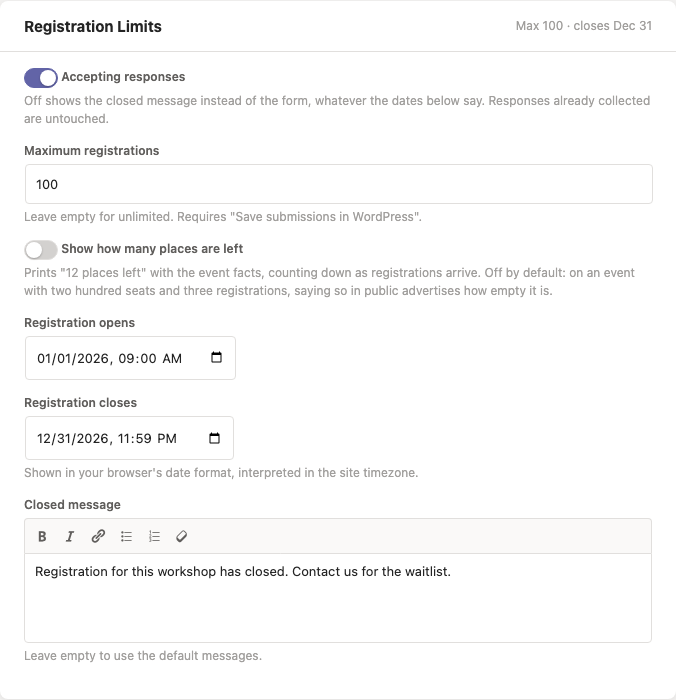
Accepting responses
Accepting responses is the switch at the top of the panel, on for every form. Turn it off and the form stops taking submissions immediately: visitors see the closed message instead of the questions, and a submission from a tab that was already open is refused too.
It overrides the dates below rather than working with them - a form inside its opening window still closes the moment the switch goes off - and turning it back on resumes whatever those dates say. Nothing already collected is changed.
The same switch is a Stop accepting / Start accepting link on each row of LocalForm → Forms, for closing a form without opening it, and a form that is not accepting is labelled Not accepting in the Status column there.
Maximum registrations
Set Maximum registrations to cap how many submissions a form accepts. Once the count is reached, visitors see the closed message instead of the form.
The capacity check counts saved submissions, so it requires Save submissions in WordPress to be enabled. In webhook-only mode there is no local count and the cap is not applied.
On a form that charges for a registration (Pro), counting saved submissions would mean an event selling out on people who opened a checkout and walked away. Only paid registrations count toward the maximum
- on by default with payments - counts the ones that were actually paid for instead.
Show how many places are left
Tick Show how many places are left and the form prints "12 places left" with the event facts above the first question, counting down as registrations arrive.
Off unless you ask for it: on an event with two hundred seats and three registrations, saying so in public advertises how empty it is. It needs a maximum to count against, and it counts the same thing the maximum does - so with payments set to count only paid registrations, an abandoned checkout does not take a place off the number; with a waiting list, somebody waiting does not either; and with group registration counting people, a booking for four takes four places off it. On a form with places per date, each date says what is left on it too.
Open and close times
Registration opens and Registration closes take a date and time (in the site's timezone):
- Before the opening time, visitors see "Registration opens on …".
- From the closing time on, visitors see "Registration is closed."
Both are optional and can be combined with the capacity cap.
Closed message
By default LocalForm shows a message matching the reason (not yet open / closed / fully booked). Set Closed message to replace all of them with your own text.
Developers
The final decision goes through the localform_is_accepting filter, so you can add custom rules (e.g. members-only windows). It runs on whatever the checks above decided rather than only when they all passed, so a callback can reopen a form LocalForm closed as well as close one it left open - check the reason (not_open, closed, full) before overriding, or a form that closed by date will be reopened too.